
OpenCode
Tested with
Last verified: 2026-10-06 · OpenCode 1.18.34
An open-source terminal coding assistant that reaches any compatible gateway through a custom provider.
This page uses KunCode as an example. Replace the addresses, keys and model names with your own service's values. See placeholder conventions. The setup below was verified on Windows.
1. Install
npm install -g opencode-aibrew install sst/tap/opencodeCheck the install:
opencode --version2. Prepare an API key
See Prepare an API key. Note two things:
- API key - usually looks like
sk-...; use whatever format your provider issues - API endpoint - your service address, e.g.
https://kuncode.120403.xyz
3. Find the config file
OpenCode reads its global config from:
| OS | Path |
|---|---|
| macOS / Linux | ~/.config/opencode/opencode.json |
| Windows | %USERPROFILE%\.config\opencode\opencode.json |
Create the directory or file if it does not exist.
You can also keep it per project
Besides the global config, OpenCode also reads opencode.json from a project root, applying it only to that project.
Use the project file for team setups, and the global file for your personal defaults.
4. Fill in the config
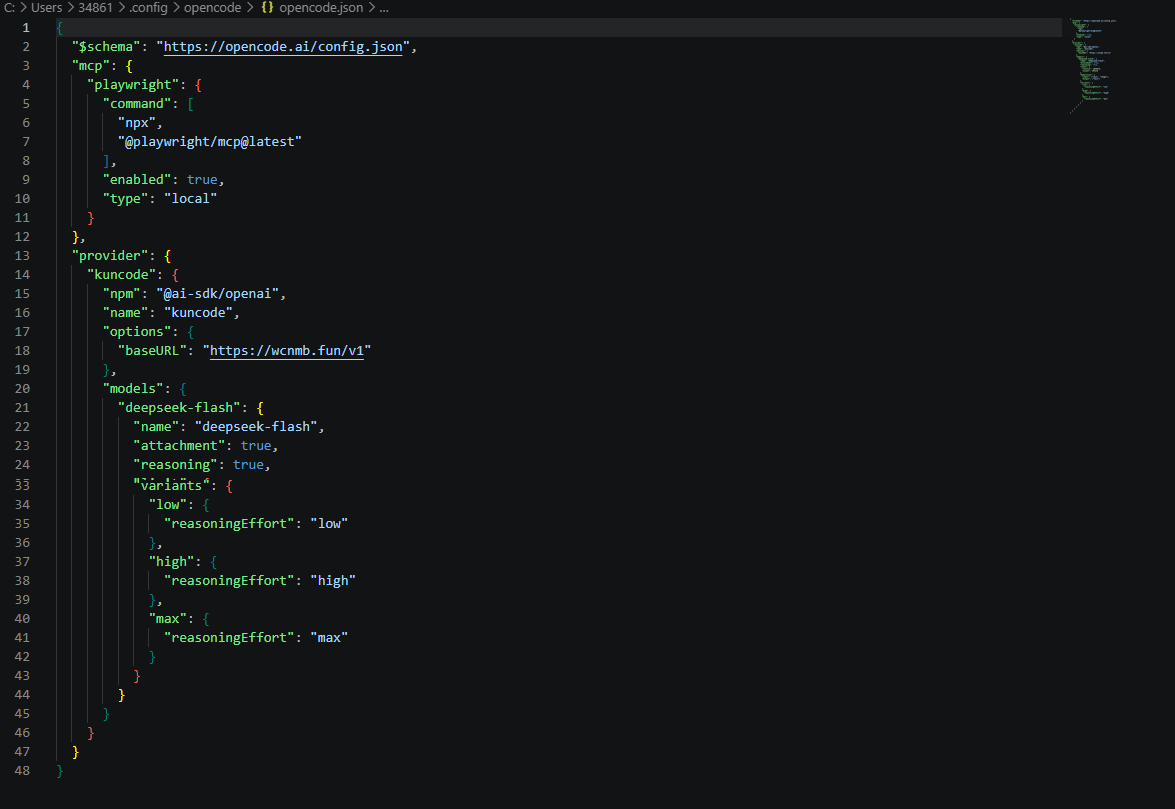
Open opencode.json and add your service under provider:
{
  "$schema": "https://opencode.ai/config.json",
  "provider": {
    "kuncode": {
      "npm": "@ai-sdk/openai",
      "name": "KunCode",
      "options": {
        "baseURL": "https://kuncode.120403.xyz/v1"
      },
      "models": {
        "deepseek-flash": {
          "name": "DeepSeek Flash",
          "attachment": true,
          "reasoning": true,
          "variants": {
            "low": { "reasoningEffort": "low" },
            "high": { "reasoningEffort": "high" },
            "max": { "reasoningEffort": "max" }
          }
        }
      }
    }
  }
}
Field reference:
| Field | Meaning |
|---|---|
kuncode | Custom provider ID; any string works |
npm | AI SDK package; see below |
name | Display name shown in the OpenCode UI |
options.baseURL | Your API endpoint plus /v1 |
models | Available models; the key is the model ID |
npm decides which API is used
@ai-sdk/openai- uses the Responses API (/v1/responses)@ai-sdk/openai-compatible- uses Chat Completions (/v1/chat/completions)
Both work. The example above uses @ai-sdk/openai (Responses), because it has been verified against KunCode.
If you are not sure which API your service supports, try them in this order:
- Check the provider console or documentation for a
/v1/responsesendpoint. - If it is supported, or you cannot confirm either way, start with the default example above (Responses).
- If the request returns
404or503, the service most likely only speaks Chat Completions. Changenpmto@ai-sdk/openai-compatibleand try again. - If both fail, first check that your Base URL ends with
/v1, then troubleshoot with Choose an endpoint.
Keys under models must be real model IDs
The keys in models (e.g. deepseek-flash) must exactly match the model IDs the API returns.
List them with:
curl https://kuncode.120403.xyz/v1/models \
  -H "Authorization: Bearer sk-xxxxxxxx"
5. Add the API key
The key is not written into the config. Use the /connect command, which stores credentials in OpenCode's own file.
Start OpenCode:
opencodeThen type:
/connectPick your provider (KunCode) and paste the API key.
The key is stored at:
| OS | Path |
|---|---|
| macOS / Linux | ~/.local/share/opencode/auth.json |
| Windows | %USERPROFILE%\.local\share\opencode\auth.json |
Why not put it in opencode.json
opencode.json often gets committed to Git or shared with teammates. Keeping the key in a separate auth.json is safer and avoids accidental leaks.
6. Verify
In the interface, type:
/modelsYour provider and model should be listed:
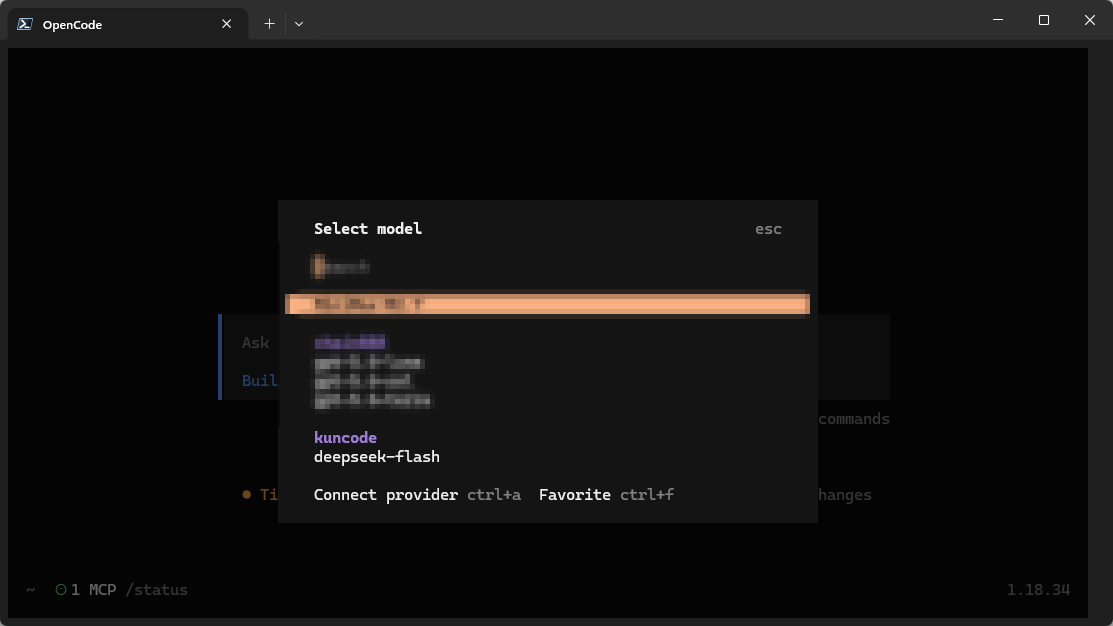
Pick the model and send any message. A normal reply means the setup works.
You can also verify with a single command:
opencode run "print hello"7. Common settings
Add more models
Just keep appending to models:
"models": {
  "deepseek-flash": { "name": "DeepSeek Flash", "reasoning": true },
  "gpt-5": { "name": "GPT-5", "reasoning": true },
  "claude-sonnet-4": { "name": "Claude Sonnet 4" }
}
Define reasoning-effort variants
variants lets one model expose several reasoning levels you can switch between without editing the config:
"deepseek-flash": {
  "name": "DeepSeek Flash",
  "reasoning": true,
  "variants": {
    "low": { "reasoningEffort": "low" },
    "high": { "reasoningEffort": "high" },
    "max": { "reasoningEffort": "max" }
  }
}
Once defined, the model picker offers each level directly.
The model must support reasoning
reasoning: true marks the model as reasoning-capable. variants has no effect on models that do not.
Hide models you do not want
If the provider exposes many models, use whitelist to keep only some, or blacklist to exclude:
"kuncode": {
  "npm": "@ai-sdk/openai",
  "name": "KunCode",
  "whitelist": ["deepseek-flash", "gpt-5"],
  "options": {
    "baseURL": "https://kuncode.120403.xyz/v1"
  }
}
Adjust the timeout
Long requests can time out; widen it for this provider only:
"options": {
  "baseURL": "https://kuncode.120403.xyz/v1",
  "timeout": 600000
}
timeout is in milliseconds, so the value above means 10 minutes. Set it to false to disable the limit.
8. Troubleshooting
For a systematic walkthrough by status code, see Errors and troubleshooting.
| Symptom | Cause | Fix |
|---|---|---|
Provider missing from /models | Wrong config path or invalid JSON | Check the file is opencode.json and validate the JSON |
401 Unauthorized | /connect not run, or wrong key | Run /connect again and paste the full key |
404 Not Found | Wrong baseURL | Must end with /v1 |
| Model missing from the list | Wrong key under models | It must match the ID from /v1/models exactly |
| Request timeout | Default timeout too short | Raise options.timeout |
| Tool calls fail | Model lacks tool-call support | Switch to a model that supports tool calls |
Advanced: put the key in the config file
If you would rather skip /connect, you can inline the key:
"options": {
  "baseURL": "https://kuncode.120403.xyz/v1",
  "apiKey": "sk-xxxxxxxx"
}
This stores the key in plain text
When you do this:
- Never commit
opencode.jsonto Git - Mask the key in screenshots
The /connect flow above is preferred. You can also reference an external file:
"apiKey": "{file:~/.secrets/kuncode-key}"Found an error or outdated content?
These docs track tool releases. Please open an issue, or use "Edit this page on GitHub" in the footer to submit a fix.